
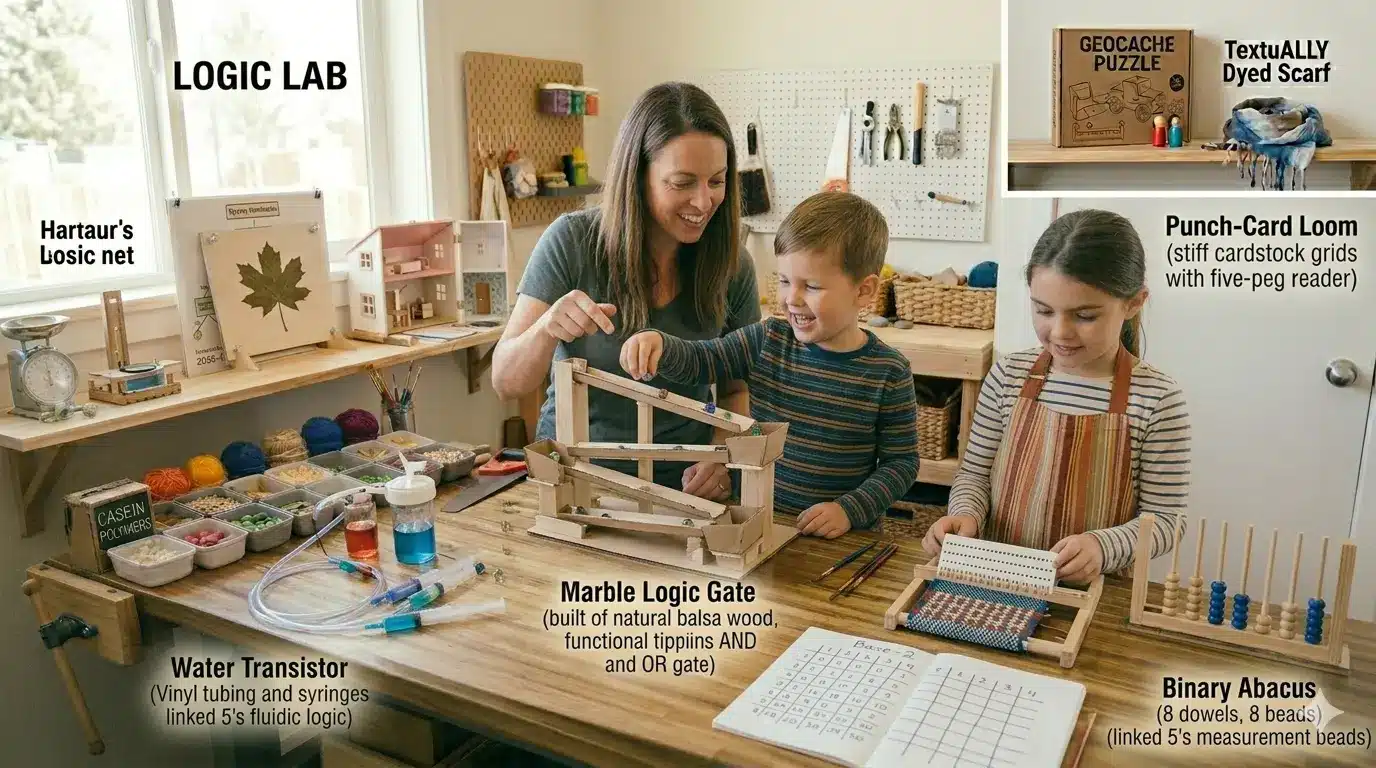
As we reach the true frontier of modern making, we move from the physical forces of air and water into the abstract force of information. High-quality DIY computing isn’t about staring at a screen; it’s about understanding the mechanical logic that allows machines to “think.” By building “Logic Engines,” children learn that computers are not magical boxes, but systems of switches that follow strict mathematical rules.
This guide explores “Off-Screen Computing,” where we build physical models of the binary systems that power our digital world.
1. The “Marble” Logic Gate (Mechanical Binary)
A computer is essentially a massive collection of “Logic Gates” that decide if information should pass through or stop. You can engineer a physical AND gate and OR gate using marbles and cardboard tracks.
The Build:
- The Input: Two marble tracks at the top.
- The Gate (OR): A “Y” junction. If a marble comes from either the left or the right track, it reaches the bottom.
- The Gate (AND): A “tipping bucket” mechanism. The bucket only releases a marble to the bottom if both input tracks deliver a marble at the same time.
Scientific Insight: This teaches Boolean Logic. The child realizes that complex decisions can be broken down into simple “True” (1) or “False” (0) physical states.
2. The “Punch-Card” Loom: Early Data Storage
Building on our “Weaver’s Loom” article, we can engineer a Binary Data System using punch cards. This is how the first computers (and automated looms) were “programmed.”
Engineering the Code:
- The Cards: Stiff cardstock with a grid of 5 holes.
- The Code: A “1” means the hole is open; a “0” means it is covered with tape.
- The Reader: A “Heddle” with 5 pegs. If the peg can pass through the hole, the thread is lifted.
- The Result: By stacking different punch cards, the child “programs” a complex pattern into the fabric without having to remember the steps manually.
3. The “Human” Processor: Understanding Algorithms
To understand how a CPU works, children can act as the “components” of a computer. This is a high-quality exercise in algorithmic efficiency.
The Roles:
- The Input: One person provides “data” (e.g., a pile of unsorted playing cards).
- The ALU (Arithmetic Logic Unit): One person follows a single rule (e.g., “If the card is Red, put it left; if Black, put it right”).
- The Memory: One person holds the sorted piles.
- The Output: The final result (a perfectly sorted deck).
The Lesson: The child sees that “processing” is just the repetition of very simple instructions at high speed.
4. The DIY “Water” Computer (Fluidic Logic)
Pioneered in the mid-20th century, fluidic computers use water pressure instead of electricity to perform calculations.
The Setup:
- The Transistor: A “T-junction” of vinyl tubing.
- The Control: A small syringe that can “pinch” one side of the tube.
- The Logic: If the syringe is pressed (1), the water flow is redirected. This is a physical representation of how a transistor works in a silicon chip—using a small signal to control a larger one.
5. The “Binary” Abacus: Base-2 Mathematics
We use “Base-10” (1-10), but computers use “Base-2” (0 and 1). A high-quality Binary Abacus helps children “speak” the language of machines.
The Geometry of Numbers:
- The Frame: A wooden board with 8 vertical dowels.
- The Values: Each dowel represents a power of 2 ($2^0, 2^1, 2^2, 2^3$, etc.).
- The Play: A single bead on a dowel is “1” (Up) or “0” (Down). To represent the number 5, the child flips the $2^2$ (4) and $2^0$ (1) beads to the “Up” position ($4 + 1 = 5$).
Computing Standards and Safety
- Logical Integrity: If a marble gate is off by even a millimeter, the “code” fails. This teaches the child that computing requires absolute precision.
- Debugging: When a system doesn’t work, don’t fix it for them. Ask: “Where did the ‘data’ (the marble or water) stop moving?” This is the foundation of software debugging.
- Systemic Thinking: Remind the child that while their physical computer is slow, the one in your phone is doing these same steps billions of times per second.
Summary of Computing Concepts
| Project | Computing Concept | Physical Analog | Skill Developed |
| Marble Gates | Boolean Logic | Tipping Buckets | Decision Trees |
| Punch Cards | Data Storage | Cardstock Grid | Programming |
| Human Processor | CPU Architecture | Rule-Following | Algorithm Design |
| Water Transistor | Switching | Syringe / Tubing | Hardware Engineering |
| Binary Abacus | Base-2 Math | Power-of-2 Beads | Mathematical Logic |
Final Thoughts: The Ghost in the Machine
By building these “analog computers,” children realize that technology isn’t just about electricity—it’s about logic. They stop being “users” of digital products and start being “architects” of systems. They learn that every app, game, and website is just a vast, invisible version of the marble tracks and punch cards they built on the kitchen table.